Back to articles
How to Fill Out a Money Order
Money orders can offer a secure alternative to cash or personal checks for sending payments, particularly for individuals who don't have a checking account or prefer not to share their banking details. They can be purchased at a range of locations, including the U.S. Postal Service, banks, credit unions, and many retail and convenience stores.
Filling out a money order correctly is important, as errors can delay a payment or make it difficult to track or replace if it's lost or stolen. This article walks through the steps to fill out a money order, where to purchase one, and what to do if a money order is lost, stolen, or filled out incorrectly.
The process of filling out a money order is similar to filling out a check; this step-by-step guide will walk through what you need to do.
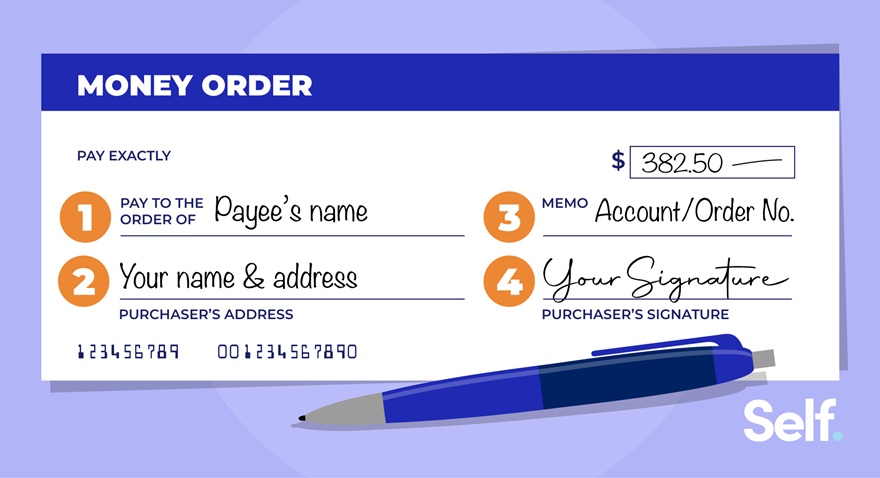
Note: Images are for illustrative purposes only.
Step 1: Fill in the payee’s name
The payee line, usually labeled "Pay to" or "Pay to the order of," should include the full name of the person or business receiving the payment.
Enter the full name and address of the person or business you're sending money to. Only the recipient named on the money order will be able to cash it; if this field is left blank, anyone could fill in their own name and claim the payment. [1]
Step 2: Write your address
After listing the recipient's details, fill in your own name and address in the section designated for the purchaser. This information should be accurate and current, since it allows the money order to be traced back to you if it needs to be returned or if there's an issue with the transaction. [1]
Step 3: Put notes in the memo field
If the money order is being used to pay a bill, write the relevant account or order number in the memo field, typically located near the bottom of the form. This field can also be used to describe what the payment is for, such as a specific purchase or a loan repayment. Including the account number helps ensure the receiving business applies the payment to the correct account. [1]
Step 4: Sign your name
Once the other fields are complete, sign the front of the money order in the section designated for the purchaser. This signature authorizes the transfer of funds and confirms you as the sender. The recipient signs separately, on the back of the money order, when they're ready to cash or deposit it. [1]
Step 5: Keep the receipt safe
After completing the money order, hold onto the receipt, since it includes a tracking number. This number can be used to confirm whether the money order was received and cashed by the intended recipient. If the money order is lost or stolen, the receipt and tracking number are needed to replace it. The receipt also makes it possible to request a refund if the money order hasn't yet been cashed, though a cancellation fee may apply. [1]
How to purchase a money order
Money orders can be purchased at any U.S. Postal Service location, as well as at many banks, credit unions, and retail or convenience stores. To buy a USPS money order, bring cash or a debit card, since credit cards and personal checks aren't accepted. A single domestic money order can be issued for up to $1,000, and the form must be filled out at the counter with a retail associate. [1]
The fee is based on the dollar amount of the money order. As of this writing, USPS charges $2.55 for money orders up to $500, and $3.60 for money orders between $500.01 and $1,000. Money orders issued by military facilities cost $0.84, regardless of amount. [2]
What happens if a money order is filled out incorrectly?
Once a money order has been completed and processed, it generally cannot be corrected. If the payee's name is wrong, the recipient may be unable to cash or deposit it. If a money order is made out to the wrong recipient entirely, recovering the funds after that person cashes it is typically not possible, so it's important to confirm the recipient's correct name before completing the form. [1]
If an error is caught before the money order is given to the recipient, the purchaser may be able to take the money order, along with the receipt, back to the issuing location to request a refund or replacement, though a fee may apply. [2]
Do money orders expire?
No. Domestic USPS money orders never expire and don't accrue interest, so the funds remain available until the recipient cashes them or the purchaser cancels the transaction. This is consistent with money orders generally: because the value is prepaid in full at the time of purchase, there's no expiration date attached to the funds. [1][2]
Sources
- Citizens Bank, “What is a Money Order?” https://www.citizensbank.com/learning/what-is-a-money-order.aspx Accessed June 23, 2026
- USPS, “Money Orders” https://www.usps.com/shop/money-orders.htm Accessed June 23, 2026
About the author
Becca has over 10 years of experience as a content writer, working across various industries including finance, digital marketing, education, travel, and technology. Her work has been featured in publications including Forbes, Business Insider, AOL, Yahoo, GOBankingRates, and more.